AI reads your text. Not your personal data.
ChatMasqué swaps names, e-mail addresses, IBANs and ID numbers for tokens the moment you paste text into an AI site. In the answer, the real values come back, on your screen only.
Free for personal use. Extension for Chrome, Edge and Brave; Firefox coming soon. No account, no server.
What we paste into AI every day
To save time, we hand real work documents to AI:
- a customer e-mail that needs an answer;
- a patient, pupil or employee file to summarise;
- a contract, invoice or statement to check.
These texts contain names, contact details and account numbers. Once sent, they leave your computer for the AI service’s servers. ChatMasqué helps you cut down what you share with it, without changing the way you work.
How it works
-
What you paste
Draft a reply to Jane Miller (jane.miller@example.com): her IBAN GB29 NWBK 6016 1331 9268 19 has changed.
-
What the AI receives
Draft a reply to [PERSONNE_1] ([EMAIL_1]): her IBAN [IBAN_1] has changed.
-
What you read
Dear Jane Miller, we have recorded your new IBAN. We will confirm the change at jane.miller@example.com.
You paste your text
As usual, on ChatGPT, Claude, Gemini or another site. The data is masked as you paste; with the preview, you see beforehand what will be masked.
The AI receives tokens
Jane Miller becomes [PERSONNE_1], her e-mail [EMAIL_1]. The AI works on the masked text as normal.
The real values come back
In the answer, one click puts the real values back in place of the tokens, on your screen only.
Features
Everything you need to work with AI on real documents while staying in control of what leaves your computer.
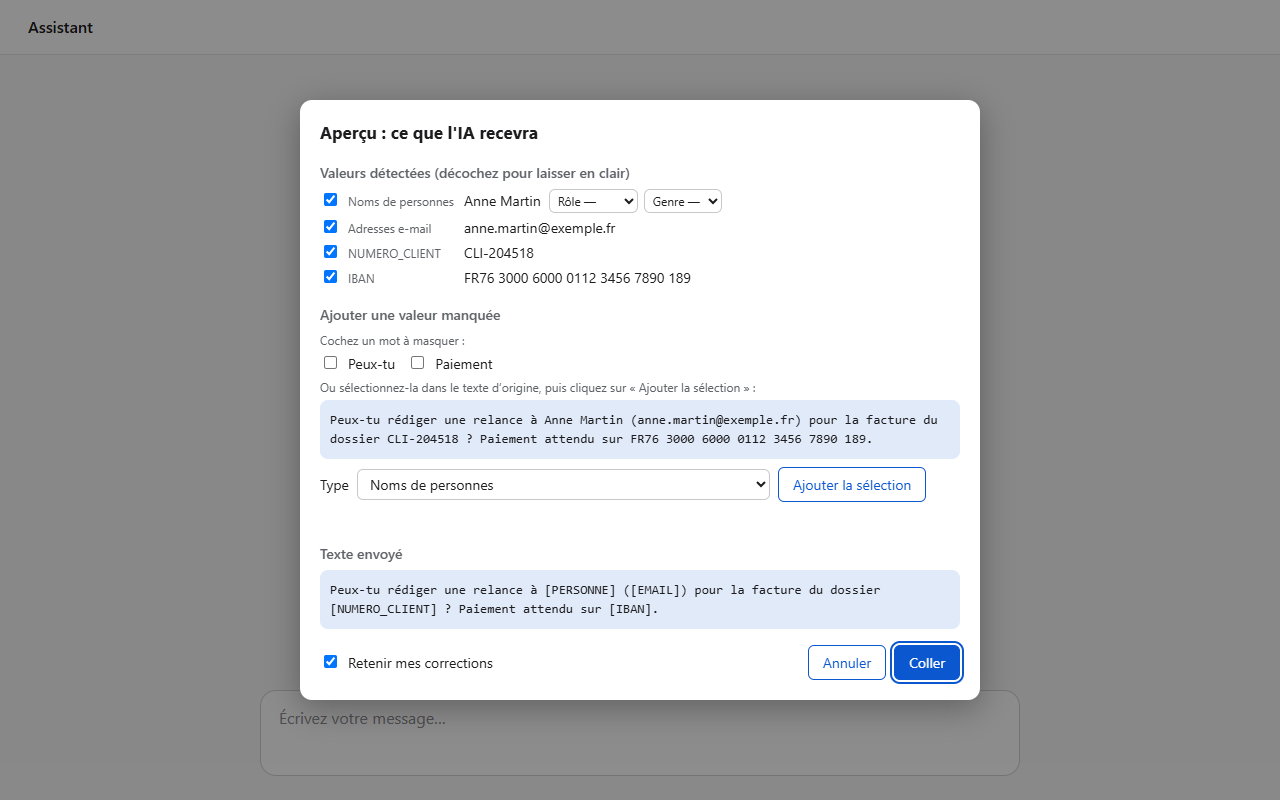
Preview before pasting
Turn it on in the settings to see exactly what the AI will receive. Untick a value or add one: your corrections are remembered.
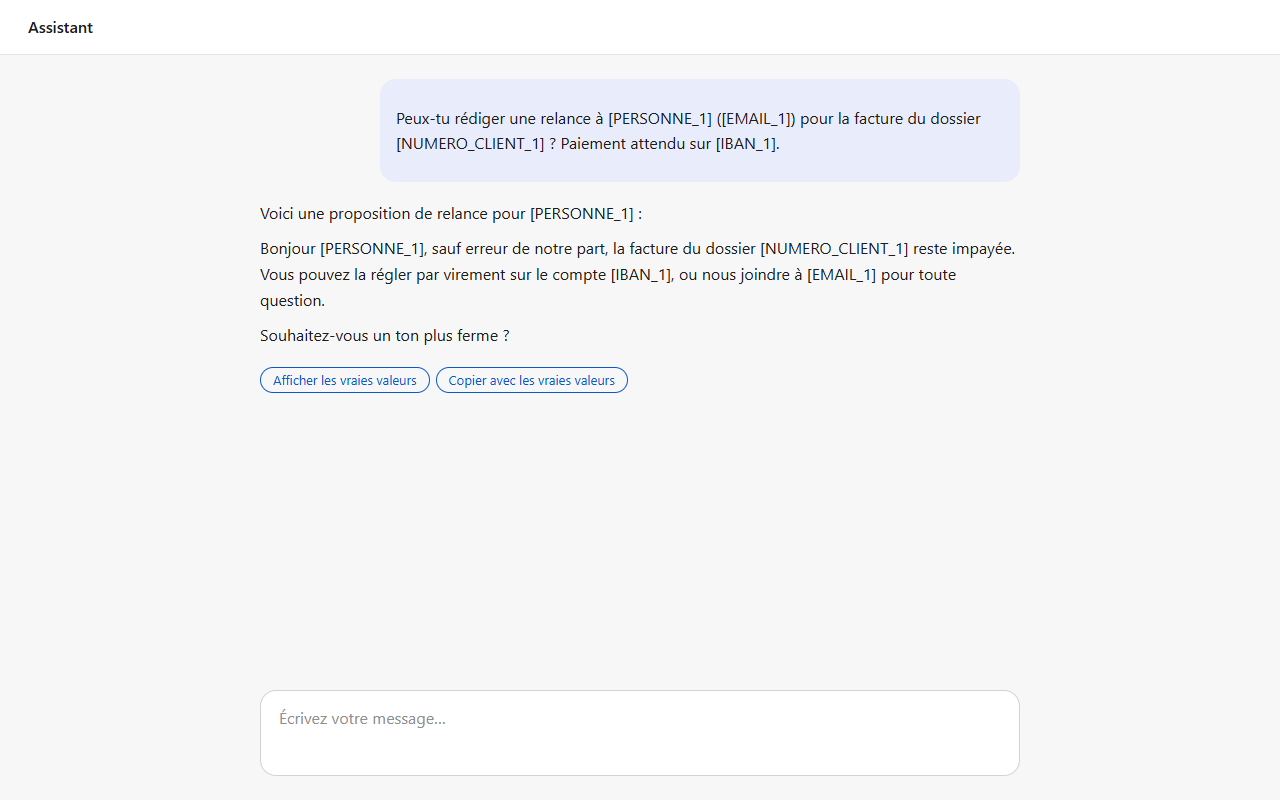
The AI only sees tokens
The AI site receives the masked text and answers with the same tokens. It never has access to the real values.
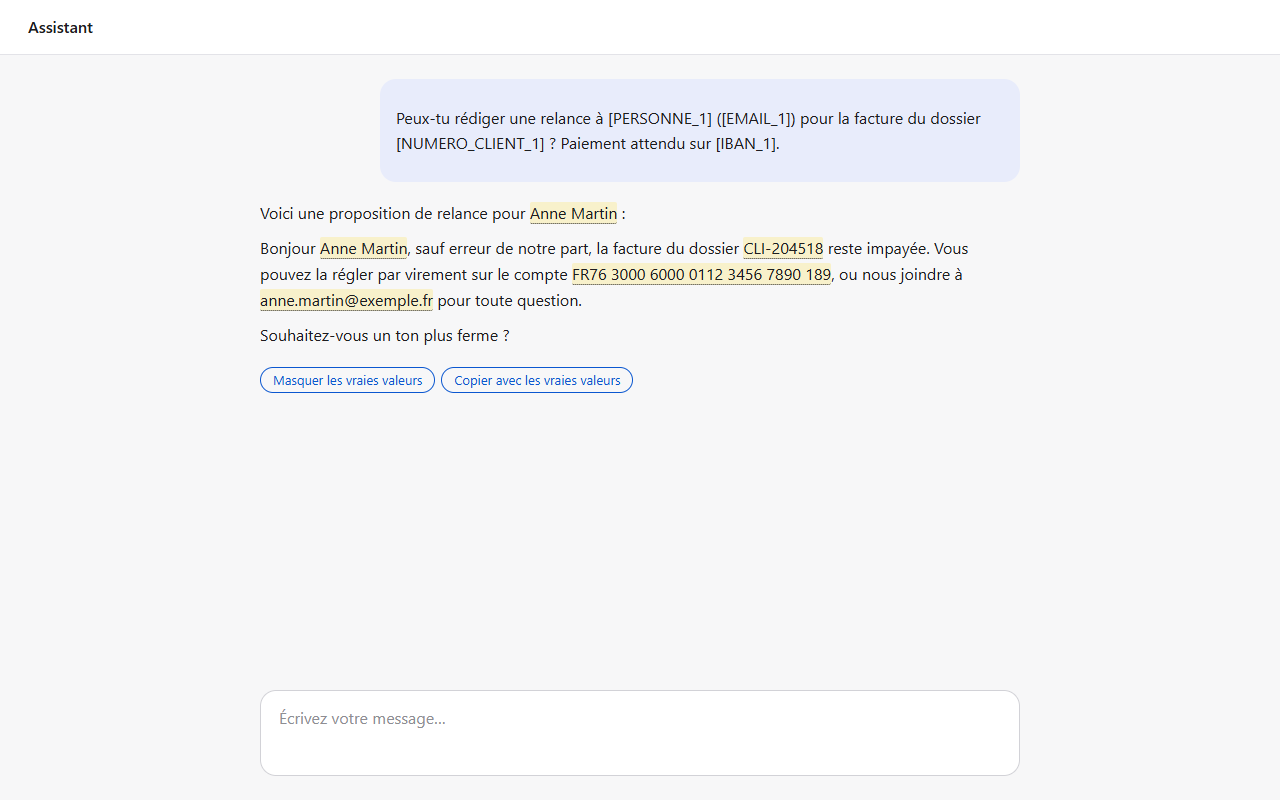
Real values, on your screen
A button under each answer, the right-click menu or a keyboard shortcut restores the real values. You can also copy the answer with the real values.
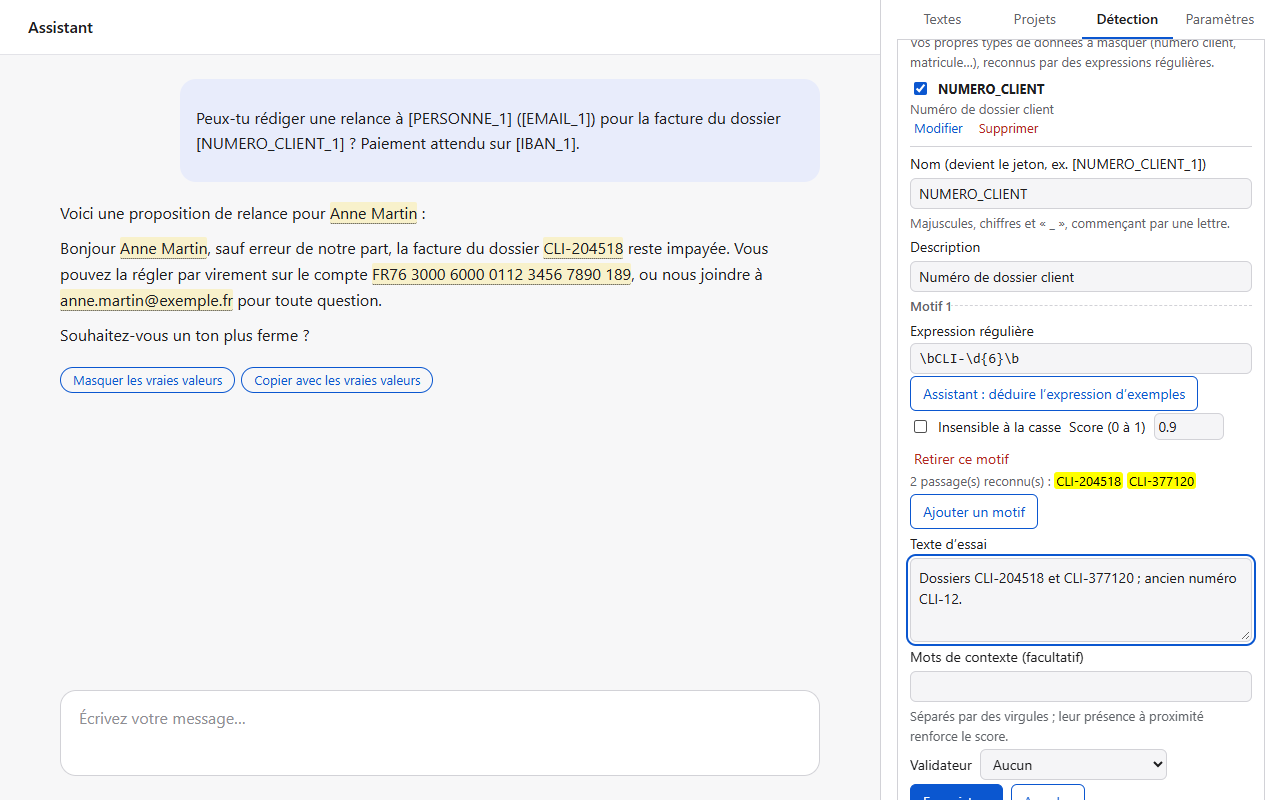
Your own data types
Customer number, staff ID, case reference: define what your line of work needs masked and test it live.
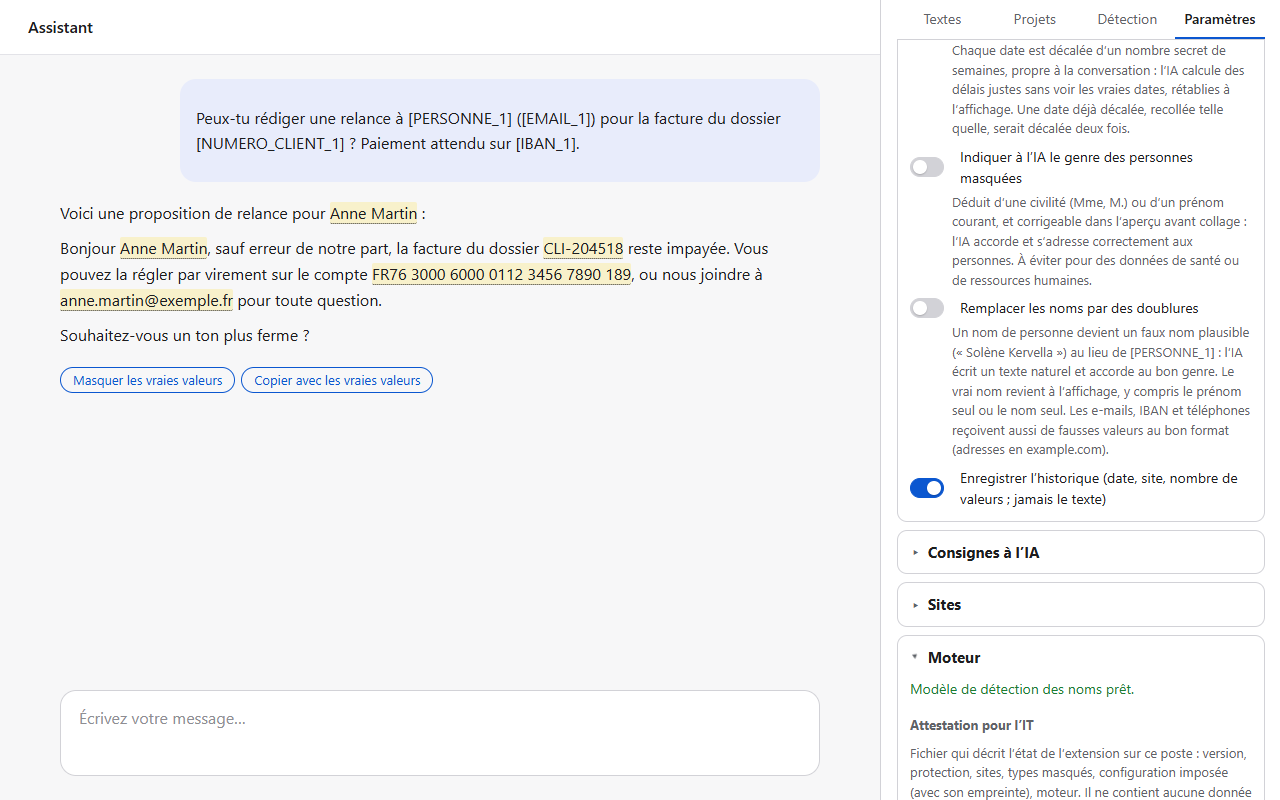
Clear settings
Choose which types to mask, how long to keep mappings, which sites are enabled, the language and the colour theme.
Typing alert
Typing an e-mail address or an IBAN instead of pasting it? ChatMasqué warns you before you send.
E-mail drafts
The AI suggests an e-mail? Insert it into your draft with the real values, after you confirm.
Workspaces
The same tokens across a whole project: ChatGPT Projects, Gemini Gems, NotebookLM notebooks.
Masked files
Word, Excel, PowerPoint, PDF, text, Markdown, CSV and HTML files are masked before upload (20 MB max).
Rules in Excel or JSON
Import and export your rules to share them with colleagues.
Files restored
Drop the document produced by the AI: Word, Excel, PowerPoint, CSV or code comes back with the real values, formatting kept.
Lists and industry templates
Import your lists of clients or patients, name their tokens ([CLIENT_1]), add healthcare, legal or HR templates in one click.
Encrypted backup
Get your mappings back on another computer: a file encrypted with your passphrase, which only you can open.
Six languages
Interface in French, English, German, Italian, Spanish and Arabic, with several colour themes.
What gets masked
- People, places, organisations
- Detected by an AI model that runs inside your browser.
- Contact details
- E-mail addresses, phone numbers, social media profiles.
- Banking
- IBAN, BIC / SWIFT, bank cards.
- Identity
- Social security (France), national register (Belgium), AHV/AVS (Switzerland), DNI and NIE (Spain), codice fiscale (Italy), Steuer-ID (Germany), NNI and ID cards (Côte d’Ivoire, Morocco and Africa), CNPS, IPRES, CSS, CNSS, SSN and ITIN (United States), passports, dates of birth.
- Business and tax
- SIREN, SIRET, VAT (France, Belgium, Spain, Italy, Germany), UID (Switzerland), tax number, partita IVA (Italy), ICE (Morocco), RCCM (OHADA), NINEA (Senegal), NCC (Côte d’Ivoire), EIN (United States).
- Technical and vehicles
- IP addresses, GPS coordinates, licence plates, and your own data types.
Work better with AI
Masking is not enough: the AI also has to understand the masked text. These options help it do so, without ever giving it the real values.
Instruction to the AI
Once per conversation, ChatMasqué asks the AI to copy tokens exactly as they are, so the real values come back without errors.
Stand-ins
Instead of [PERSONNE_1], the AI reads a plausible fake name and writes natural text. The real name comes back on display. E-mails, IBANs and phone numbers also get fake values in the right format.
Who’s who
The AI knows whether [PERSONNE_1] is a woman or a man, from the title or first name, and which role you give them: it addresses and words its answer correctly.
Shifted dates
Dates are shifted by a secret number of weeks, specific to each conversation. The AI calculates correct time spans; on display, the dates return to their real value.
Document firewall
Long pasted texts are presented to the AI as data to process, to help it avoid following instructions a document might hide.
Your instructions
Add your own instructions before or after the pasted text (tone, role, answer format). ChatMasqué also asks the AI not to remember anything and not to ask you for personal data.
The instruction is on by default; the other options can be turned on in the settings, as you need them.
Everything stays on your computer
ChatMasqué runs entirely in your browser. Its publisher receives nothing from you.
No server
No account, no telemetry, no statistics, no advertising.
One connection
A one-time download of the name-detection model from Hugging Face.
Encrypted and erased
Token → real value mappings are encrypted (AES-GCM) and erased after 7 days by default (1, 7, 30 or 90 days).
Pseudonymisation
In GDPR terms (Article 4(5)): the AI only receives tokens and cannot restore the real values.
What the AI site receives
- The masked text, with its tokens: [PERSONNE_1], [EMAIL_1]…
- The masked files you upload
What never leaves your computer
- The real values: Jane Miller, jane.miller@example.com…
- The mappings between tokens and real values
- Your settings and data types
When detection gets it wrong
No tool spots 100% of personal data: a rare name or a code specific to your line of work can slip through. ChatMasqué therefore does not rely on detection alone. Several safety nets catch what it misses:
- Preview before pasting: see what the AI will receive, add a missed word; your organisation can make it mandatory.
- Mask the selection: right-click a word in the input box to turn it into a token.
- Typing warning: personal data typed by hand is flagged before sending.
- Learning mode: the AI flags what was left in clear text, and one click masks it next time.
- Always mask: your lists of clients, patients or employees are masked everywhere.
And the rest of the text (a job title, a place, an event) can sometimes be enough to recognise a person: rereading what you send is still the right habit.
For organisations
Lawyers, doctors, HR, accountants, teachers, customer service: your teams already use AI. IT and data protection officers can set the rules.
Enforced configuration
IT enforces the settings through Group Policy (GPO), Intune or Google Admin.
Your data types
Case numbers, staff IDs, internal references: define once what the organisation must mask.
Shared rules
Roll out the same rules to the whole team as an Excel or JSON file.
GDPR, FADP and professional secrecy: what ChatMasqué brings →
Pricing
- Personal use: free, with no time or feature limit, for an individual using it privately.
- Professional use: companies, freelancers, public bodies, associations, schools: a licence is required. Contact the author; adapted terms exist for non-profits, education and the public sector.
Request a licence developer@chatmasque.com
Supported sites
- ChatGPT
- Claude
- Gemini
- Microsoft Copilot
- Microsoft 365 Copilot
- Le Chat (Mistral)
- Perplexity
- DeepSeek
- NotebookLM
- Grok
- Meta AI
- Qwen
- Kimi
- HuggingChat
- Apertus (Public AI)
Plus any other https site you add in the extension’s settings.
Frequently asked questions
Does my data go anywhere?
No. Masking happens on your computer. The AI site only receives the masked text, and ChatMasqué’s publisher receives nothing. The extension’s only connection is a one-time download of the name-detection model from Hugging Face.
What if something is not detected?
It goes through as it is. That is why there are several safety nets: the paste preview shows you what the AI will receive and lets you add the missing value; right-clicking a word in the input box masks it; learning mode has the AI flag what was left in clear text. Either way, ChatMasqué will remember it next time.
Is this anonymisation?
No, it is pseudonymisation. Data is replaced by tokens such as [PERSONNE_1], and only your browser can link them back to the real values. The AI cannot recover them, but for you this data is still personal data.
How do I anonymise a text before sending it to ChatGPT?
Paste it as usual on the AI site: ChatMasqué first replaces the personal data (PII) with tokens, on your computer. Strictly speaking, this is pseudonymisation rather than anonymisation: only your browser can restore the real values, which lets you read the answer in clear text.
Is it free?
Yes, for personal and private use. Any professional use (company, freelancer, public body, association, school) requires a licence: write to the author at developer@chatmasque.com. Adapted terms exist for non-profits, education and the public sector.
Which browsers?
Google Chrome, Microsoft Edge and Brave, on desktop. A version for Firefox (128 and later) is ready and will be published soon.
Do I need an account?
No. There is no account, no sign-up and no server. Install the extension and it works.
How do I add another site?
Open the extension’s panel, go to the settings and enter the site’s address. It must use https; the browser then asks for permission for that site only.
How do I erase everything?
The panel’s “Delete all data” button removes the mappings and the history. Otherwise they are erased automatically after the period you chose. Uninstalling the extension deletes all of its data.
Keep the AI, mask the rest
Install ChatMasqué and keep pasting your texts as before.